First-user check · PicoClaw
I opened PicoClaw as a first-time visitor. Here is what I hit.
https://github.com/afjcjsbx/picoclaw, opened Oct 12 the way a first visit goes: one page load, no account, nobody explaining. Each point is what the page showed, not a promise about results.
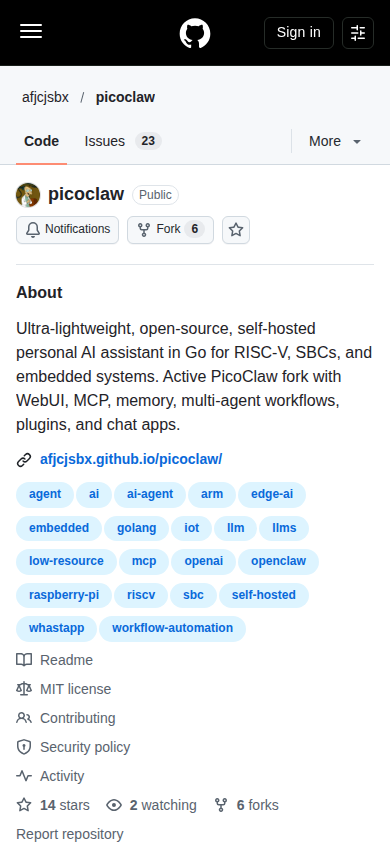
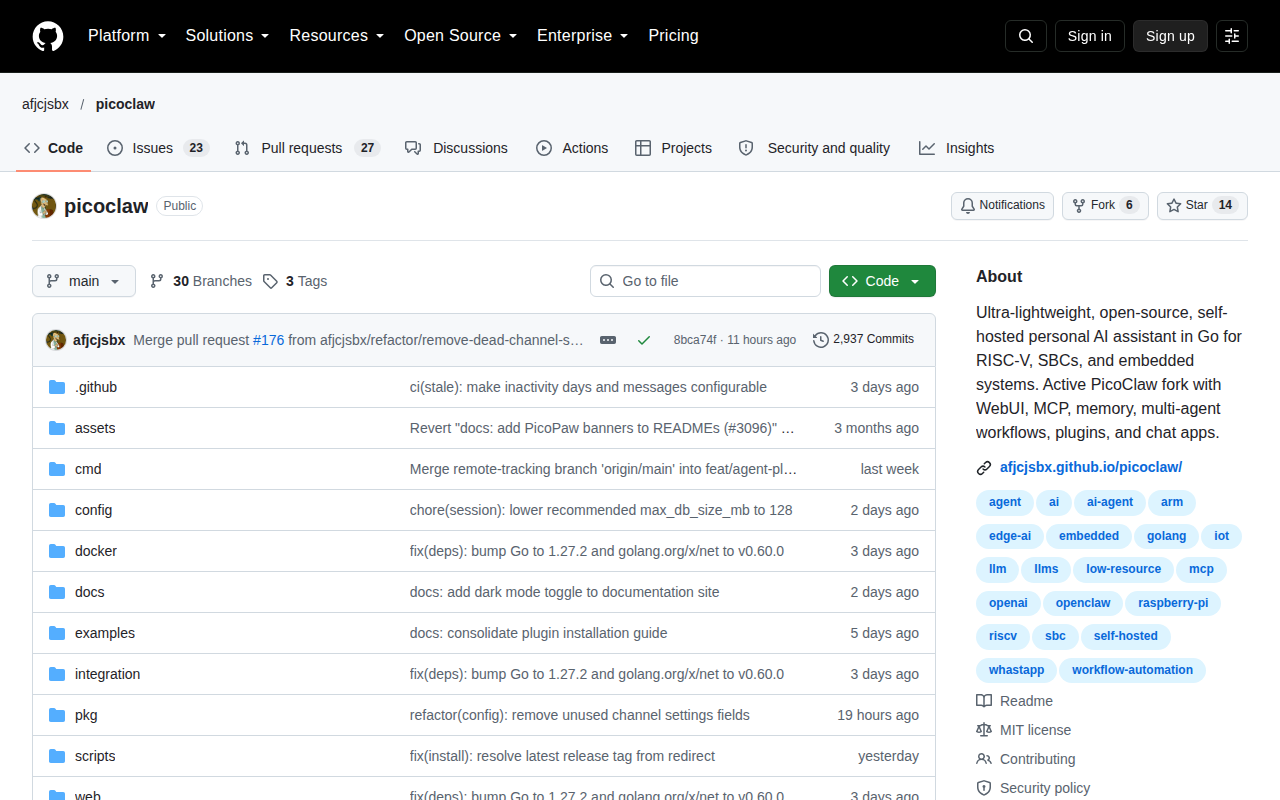
- The About line says what it is and where it runs: "Ultra-lightweight, open-source, self-hosted personal AI assistant in Go for RISC-V, SBCs, and embedded systems." But it only calls itself "Active PicoClaw fork", without saying what this fork adds over the Sipeed original. About, first screen of the repo
Fix: Add one line naming the original project and what is new here since development resumed. - The topics include "whastapp", so the repo is missing from the whatsapp topic page, where people looking for a chat-connected assistant browse. Topics
Fix: Rename the topic to whatsapp. - "Ultra-lightweight" is the lead claim, but the About gives no number a board owner can check. About
Fix: Put the footprint, such as idle RAM use and binary size, in the About line. - A visitor sees 14 stars and 6 forks next to 23 open issues and 27 open pull requests. The post invites contributions, and a contributor will check whether pull requests get reviewed. repository header tabs
Fix: Triage or close stale pull requests and say in the Contributing guide how they are reviewed.
What the page showed, measured
The first words a visitor reads:
“GitHub - afjcjsbx/picoclaw: Ultra-lightweight, open-source, self-hosted personal AI assistant in Go for RISC-V, SBCs, and embedded systems. Active PicoClaw fork with WebUI, MCP, memory, multi-agent workflows, plugins, and chat apps. · GitHub Skip to content Navigation Menu Sign in Appearance settings Platform AI CODE CREATION GitHub Copilot Write better code with AI GitHub Copilot app Direct agents from issue to merge MCP Registry Integrate external tools DEVELOPER WORKFLOWS Actions Automate any workflow Codespaces Instant dev environments Issues Plan and track work Code Review Manage code cha”
- Load
- 821 ms for the page itself, scripts aside
- Title
- GitHub - afjcjsbx/picoclaw: Ultra-lightweight, open-source, self-hosted personal AI assistant in Go for RISC-V, SBCs, and embedded systems. Active PicoClaw fork with WebUI, MCP, memory, multi-agent wo
- Description tag
- Ultra-lightweight, open-source, self-hosted personal AI assistant in Go for RISC-V, SBCs, and embedded systems. Active PicoClaw fork with WebUI, MCP, memory, multi-agent workflows, plugins, and chat apps. - afjcjsbx/picoclaw
- Buttons and links seen
- Sign in · Pricing · Sign up
- Price words
- on the page
- Phone layout tag
- present
- Size
- 514 words, 1 images, 167 links, a store listing
Free plan · made for PicoClaw
Post in the 12 communities whose rules allow PicoClaw.
Your free plan shows the saved rules for the 8 that fit best. Use ThreadFox to write posts, publish them and keep up with replies.
$19.99 total, one time. 30-day self-service refund.Your $19.99 offer ends October 19.
The first communities in your free plan
r/github
Allows it in its dedicated megathread“To keep the subreddit clean and focused, self-promotion and project sharing should only happen in the dedicated megathread pinned at the top.”
Rules read Sep 26 · its rules on Reddit
r/freesoftware
Allows a post about it on its stated conditions“Please note that software submissions should be Free and Open-Source (This facilitates self-hosting and allows users to use the software as they please).”
Rules read Sep 26 · its rules on Reddit
Rules change: read each community’s current rules before you post.Read all rules and plan details
Check setup for my AI and computer
Will it work with my setup?
Choose your AI client and computer to see the steps before you buy. Your AI plan is separate; ThreadFox runs locally through your Chrome.
Claude Desktop · install the extension
- Use a Claude Desktop build that supports local extensions. From your private buyer library, download
ThreadFox.mcpb, open it with Claude and click Install. - Start a new regular chat. Desktop supplies Python; ThreadFox prepares Node.js if needed. The Code view uses the terminal path instead.
- Add Microsoft’s Playwright Extension to your Chrome, sign in to Reddit, then choose Set up ThreadFox under + or type
set up ThreadFox.
Linux: Claude Desktop is in beta. Confirm your build offers local extension installation. If opening the file does not offer Install, choose Claude Code or Codex and use the terminal route. Current Linux requirements.
Claude Code or Codex · use your library’s installer
- Install and sign in to your AI client on this computer first. It must support local tools.
- From your private library, copy the command for your system into PowerShell on Windows, or Terminal on macOS/Linux. Keep the full command private. It installs the tools and registers the supported clients it finds.
- Restart the AI client. Add Microsoft’s Playwright Extension to Chrome, sign in to Reddit, and ask your AI to
set up ThreadFox.
The installer uses Python 3.10+ and Node.js 18+, or downloads checksum-verified copies for supported systems. No administrator rights are needed for the ThreadFox installer. Keep the AI client and Chrome on the same computer.
Use a computer to run the tools
A phone or browser-only chat can read your library and claim the included Launch Pack, but cannot run these local tools. The pack is a one-product plan and three drafts, emailed within 24 hours of your library claim.
Continue on a computer with Claude Desktop, Claude Code or Codex. If you want our team to run the campaign, Managed is a separate service.
Ready means: after the first Chrome tab-selection prompt, the tool check passes and your AI shows the intended Reddit username. Installing a client alone does not prove the connection. Keep normal permission prompts enabled.
Full setup steps & troubleshooting · Already bought it? Open your library
We used ThreadFox to find your Reddit thread. Use the same tools to find useful threads, check the rules, write posts and replies, and follow up. Set it up once on your computer with a compatible AI client, Chrome and your Reddit account. Your AI service is separate. Keep using the tools beyond the three included drafts.
How AI fits in. Your AI runs the tools through your own Chrome. You set the direction and authorize the work. It checks current rules, writes, posts once and follows up. Rules, account limits and AI permission prompts still apply.
We run it on ourselves. On October 12 it brought 1,994 people from Reddit to this site. What it brings you depends on your product and what you say.
See a real post + reply
Real post + reply · r/test · October 7, 2026
Connection test, not customer results.
Original recording · post and reply excerpts
Post (title and body)
ThreadFox browser demo: one test post and reply (October 7, 2026)
I make ThreadFox, a toolkit that connects AI clients to Reddit through Chrome. This is a controlled test in r/test for a product demonstration: the tool fills this text, publishes once, and reads the resulting link. One reply will test the conversation step. No customer or campaign result is being claimed.
Reply (body only)
This is the reply step of the ThreadFox connection test. The tool submitted this through the same signed-in Chrome connection. Product and setup guide: https://threadfox.vip/guide . This is a technical demonstration, not a testimonial or sales result.
A real r/test recording, with pauses shortened. Transcript
Keep the plan. Put it to work.
Your researched plan for PicoClaw: communities to consider, what each expects and the mistakes to avoid. Free. Usually arrives within an hour.
Your free plan for PicoClawRead the plan and community rules
For PicoClaw
Where you can post PicoClaw
We looked PicoClaw up from your post in r/coolgithubprojects. Not yours? Look up your own product (the kind, apps, websites and software, is our guess).
12 communities’ rules allow a post about it; the 8 that fit best are below.
Where its rules allow it, and how
r/github 213,965 members
It allows it in its dedicated megathread · fits your product by name or subject
“To keep the subreddit clean and focused, self-promotion and project sharing should only happen in the dedicated megathread pinned at the top.”
Its conditions and rules, word for word
Other requirements in its rules:
- “All posts must clearly relate to GitHub, including thoughtful context, technical insights, or meaningful discussion.”
- “Examples include posting just a URL, contribution charts, promoting profiles, complaints about captchas or questions that can easily be Googled or answered before”
- “Posts without proper flair may be removed (doesn't apply to posts that don't fit any of the existing flairs).”
- “Post must be in English”
- “Post titles must be in English.”
- “Account suspension posts”
- “Complaints about your account being suspended or shadowbanned should be added to the pinned post.”
All 8 of its rules for posts, word for word
- Content must be on-topic All posts must clearly relate to GitHub, including thoughtful context, technical insights, or meaningful discussion. Simply linking a repository is not sufficient.
- No low-effort posts Avoid submitting content lacking effort. Examples include posting just a URL, contribution charts, promoting profiles, complaints about captchas or questions that can easily be Googled or answered before
- No coding or Git help requests Posts asking for help with writing, fixing, or understanding code should be directed to more appropriate communities like r/learnprogramming or StackOverflow. Keep discussions focused on GitHub itself.
- Promote your projects in the pinned megathread To keep the subreddit clean and focused, self-promotion and project sharing should only happen in the dedicated megathread pinned at the top.
- Use appropriate flairs Posts without proper flair may be removed (doesn't apply to posts that don't fit any of the existing flairs).
- Post must be in English Post titles must be in English. Non-English content in the body is allowed if an English translation is included.
- Be respectful and follow Reddiquette No rude behavior, trolling, pointless complaining, spam, or promoting scams.
- Account suspension posts Complaints about your account being suspended or shadowbanned should be added to the pinned post. Any other posts on this subject will be removed.
Rules read Sep 26 · its rules on Reddit
r/freesoftware 51,747 members
It allows a post about it on its stated conditions · for your kind of product
“Please note that software submissions should be Free and Open-Source (This facilitates self-hosting and allows users to use the software as they please).”
Its conditions and rules, word for word
Its conditions, word for word:
- “Do us a favor and explain WHY the community should look at it and/or use it.”
- “Proprietary software submissions are not allowed.”
- “Make sure to tag your post appropriately.”
and 6 more in its rules
- “All posts flaired as a Software Submission are REQUIRED to respond to the automod comment requesting additional information within an hour of posting.”
- “You must follow the additional information instructions correctly.”
- “Adding this information into your initial post WILL NOT bypass this requirement.”
- “Using a different flair to bypass this will result in your post also being removed.”
- “This subreddit does NOT allow software created by Generative AI and Vibe-coded software.”
- “Please do not post freeware that has no source code available under a free license.”
Other requirements in its rules:
- “Use the correct flair for your post type”
- “Post flair serves to help users identify which content a post may include.”
- “Certain moderator actions are also triggered based on the post flair.”
- “Because of this we require all surveys to have mod approval before posting (send a modmail with a link to survey asking for approval).”
- “Do not promote, encourage, link to, request or offer pirated software and content.”
- “All posts flaired as a Software Submission are REQUIRED to respond to the automod comment requesting additional information within an hour of posting.”
- “Using a different flair to bypass this will result in your post also being removed.”
All 10 of its rules for posts, word for word
- Generative AI Use / Vibe-coding This subreddit does NOT allow software created by Generative AI and Vibe-coded software. Why? Please read our wiki page Allowed: - Write documentation - Debug software (Analysis/Explanation Only) - Analyze codebase Not Allowed: - AI Assistance beyond what is mentioned above - All or part of the application being generated by AI
- No Spam This subreddit is for discussion of software that respects users freedoms and rights. It is not for you to spam your commercial site or provide a link to some shady site.
- Don't be rude This boils down to one simple thing: Don't be an asshole. No name calling, no superiority complexes, no putting others down and so on.
- Use the correct flair for your post type Post flair serves to help users identify which content a post may include. Certain moderator actions are also triggered based on the post flair. Make sure to tag your post appropriately. Failure to do so may result in your post being removed.
- Free Software Submissions Only Submitting software for the community to look at? Awesome! Do us a favor and explain WHY the community should look at it and/or use it. Please note that software submissions should be Free and Open-Source (This facilitates self-hosting and allows users to use the software as they please). Proprietary software submissions are not allowed.
- No Surveys Surveys are great for collecting data, but that's exactly the problem. Because of this we require all surveys to have mod approval before posting (send a modmail with a link to survey asking for approval). Surveys that have not been approved will be removed. Additionally, all surveys will have a disclaimer about data collection and advising community members to use caution when partaking in surveys.
- No Piracy Piracy isn't ethical and quite frankly, illegal. On-top of that, inexperienced users can end up doing some damage to their systems. For everyone's sake, keep discussion on topic to software that respects your right to do what you want with it. Do not promote, encourage, link to, request or offer pirated software and content. Posts and comments breaking this rule will be removed.
- Just The Facts In order to facilitate proper discussion, claims should be backed up with actual facts. Please do not go around spouting random information that you cannot back up with claims (ex: duckduckgo steals your search history). Opinions are acceptable but don't label them as factual.
- Software Submissions All posts flaired as a Software Submission are REQUIRED to respond to the automod comment requesting additional information within an hour of posting. You must follow the additional information instructions correctly. # Failure to do this step will result in your post being removed. Adding this information into your initial post WILL NOT bypass this requirement. Using a different flair to bypass this will result in your post also being removed.
- posting guidelines Please do not post freeware that has no source code available under a free license.
Rules read Sep 26 · its rules on Reddit
r/opensource 384,892 members
It allows a post about it on its stated conditions · for your kind of product
“We encourage you to be proud of/promote your work to a degree, but we also don't want users using this sub as a link farm to promote their project/website/YouTube channel.”
Its conditions and rules, word for word
Its conditions, word for word:
- “Reddit recommends that <10% of your posts promote your content.”
- “We're a *little* more forgiving, but don't take advantage of it.”
- “Code or repositories linked to MUST have a LICENSE file that MUST be an OSI listed Open Source license: https://opensource.org/licenses”
and 3 more in its rules
- “Drive-by posts from accounts where there is obviously no intention of engaging in the following discussion may be removed.”
- “Promotional is when you are sharing a project, yours or otherwise.”
- “"It's perfectly fine to be a redditor with a website, it's not okay to be a website with a reddit account."”
Other requirements in its rules:
- “No Sensationalized Titles”
- “No Drive-By Posting / Karma Farming”
- “Karma farm accounts are not going to be welcome here, regardless of the validity of the posted content.”
- “No Link Aggregations”
Its rule points to Reddit's site-wide rules; those apply there too.
All 9 of its rules for posts, word for word
- Be Respectful This shouldn't need to be a rule, but this is the internet. People can unnecessarily be jerks sometimes. We'd much appreciate it if this wasn't a place where that happens. Please refrain from talking down to people, being overly patronizing, name-calling, personal insults, etc. Hate speech of any kind will not be tolerated. For a refresher, please see Reddit's entry on Reddiquette as a general guideline.
- No Spam or Excessive Self-Promotion Reddit has clear rules about self promotion. We encourage you to be proud of/promote your work to a degree, but we also don't want users using this sub as a link farm to promote their project/website/YouTube channel. Reddit recommends that <10% of your posts promote your content. We're a *little* more forgiving, but don't take advantage of it. *"It's perfectly fine to be a redditor with a website, it's not okay to be a website with a reddit account."*
- Memes & Low-Effort Posts This sub is a place for discussion and news regarding the world of open source projects. There are literally hundreds of other subs dedicated to memes and shitposting. Please keep those kinds of posts in those subs. All AI-generated content is low-effort and ban worthy.
- Be On-Topic Posts should be of direct relevance to the open source community. Off-topic posts will be removed. Code or repositories linked to MUST have a LICENSE file that MUST be an OSI listed Open Source license: https://opensource.org/licenses
- No Sensationalized Titles If your post is a link to an article, please keep your post title as close to, if not the same as, the linked article's title. You're more than welcome to post a comment in the thread that states your opinion of said article.
- No Drive-By Posting / Karma Farming Karma farm accounts are not going to be welcome here, regardless of the validity of the posted content. Drive-by posts from accounts where there is obviously no intention of engaging in the following discussion may be removed.
- No Link Aggregations If there's an article within an aggregation of links/stories or a newsletter, link to the actual story or article.
- Use Correct Flairs Flairs should reflect the nature of the post. Promotional is when you are sharing a project, yours or otherwise. Alternatives is when you are soliciting for suggestions of OSS that fulfills a need. Discussion is for asking general questions when Promotional or Alternatives does not apply. Community is for something that will or has happened when Promotional does not apply.
- posting guidelines # DO NOT POST WITHOUT READING THE RULES
Rules read Sep 26 · its rules on Reddit
Show 5 more best-fit communities and their rules
r/ShowYourApp 18,350 members
It allows a post about it on its stated conditions · for your kind of product
“This community exists for makers, devs, and founders to share their apps, SaaS, and software projects.”
Its conditions, word for word:
- “Just make sure your post includes a short description or context — don’t drop a bare link.”
- “Comment on others’ posts, give feedback, and celebrate wins together.”
All 5 of its rules for posts, word for word
- Show What You’ve Built This community exists for makers, devs, and founders to share their apps, SaaS, and software projects. Show us what you’ve created — web apps, mobile apps, tools, extensions, anything!
- Links Are Allowed 🚀 You can share your app’s website, landing page, or demo link. Just make sure your post includes a short description or context — don’t drop a bare link.
- Be Respectful No hate, spam, or trolling. Be kind and constructive when giving or receiving feedback.
- Help Others Grow Comment on others’ posts, give feedback, and celebrate wins together. The more you engage, the more your own app gets noticed.
- sidebar Welcome to r/ShowYourApp 🚀 A community for indie makers, developers, and founders to share their apps, web apps, SaaS, or software projects. 💡 Show what you’ve built 🌍 Get feedback & exposure 🤝 Connect with other creators Whether it’s your first launch or your 10th, this is your space to showcase your work and inspire others!
Rules read Oct 4 · its rules on Reddit
r/MacroStartups 1,974 members
It allows a post about it on its stated conditions · for your kind of product
“You are allowed to share your SaaS, startup, or product links.”
Its conditions, word for word:
- “However, posts should provide context and value (what it does, why it exists, or what feedback you want), not just a bare link.”
- “If you are sharing a project or service, clearly state what it is and what problem it solves.”
- “No misleading titles, exaggerated claims, or hidden intentions.”
Other requirements in its rules:
- “No misleading titles, exaggerated claims, or hidden intentions.”
All 5 of its rules for posts, word for word
- Respect others and be civil No harassment, hate speech, or toxic behavior. Treat all contributors and members with kindness.
- Respectful Engagement Constructive feedback, discussions, and criticism are encouraged. No personal attacks, harassment, or toxic behavior toward other members or their projects.
- Be Transparent If you are sharing a project or service, clearly state what it is and what problem it solves. No misleading titles, exaggerated claims, or hidden intentions.
- Promotion and Links You are allowed to share your SaaS, startup, or product links. However, posts should provide context and value (what it does, why it exists, or what feedback you want), not just a bare link.
- sidebar Share startups idea, help and journey
Rules read Oct 4 · its rules on Reddit
r/software 377,073 members
It allows it on its set day · for your kind of product
“The one exception is if you share on Wednesdays, use the appropriate flair and provide something of value to the community rather than just the software.”
Its conditions, word for word:
- “Don't promote your own software unless its open source.”
- “That could be a great deal, or something that will make it worth people's time to read your post.”
- “Releases should be for new programs or big updates.”
and 8 more in its rules
- “Please do not use it as a log for your program's versions.”
- “It should also not be behind a paywall, you may have donation links, but the program should be fully usable without payments.”
- “We require users to have a certain amount of karma before making submissions.”
- “Our AutoModerator will remove submissions from users who fall below the threshold.”
- “The threshold is a secret to make it an effective way to block spam.”
- “Please don't ask for it.”
- “Don't worry though, the threshold is not set to high amounts, and if you really need to post something, do it, and send us Modmail.”
- “We'll happily manually review requests to post.”
Other requirements in its rules:
- “Do not share any links or tutorials to any copyrighted content without permission.”
- “It should also not be behind a paywall, you may have donation links, but the program should be fully usable without payments.”
All 7 of its rules for posts, word for word
- Piracy * Do not share any links or tutorials to any copyrighted content without permission. * Do not discuss software that is primarily intended or used to download, copy, or facilitate piracy or theft. * Do not discuss video downloaders.
- Spam/Self-Promotion Don't promote your own software unless its open source. Permanent ban. The one exception is if you share on Wednesdays, use the appropriate flair and provide something of value to the community rather than just the software. That could be a great deal, or something that will make it worth people's time to read your post.
- Visit r/techsupport Before Posting * Many of the posts posted here have to be removed as they are not related to software. * If your question is related to computer hardware or similar it most likely belongs to r/techsupport.
- Releases Releases should be for new programs or big updates. Please do not use it as a log for your program's versions. The program should be open-source. This is not necessary, but is highly suggested. It should also not be behind a paywall, you may have donation links, but the program should be fully usable without payments.
- Karma requirement We require users to have a certain amount of karma before making submissions. Our AutoModerator will remove submissions from users who fall below the threshold. The threshold is a secret to make it an effective way to block spam. Please don't ask for it. Don't worry though, the threshold is not set to high amounts, and if you really need to post something, do it, and send us Modmail. We'll happily manually review requests to post.
- Low Effort Put time and effort into the posts you make. Use proper grammar and clean formatting. Check our Wiki FAQ before asking repetitive questions.
- posting guidelines If a solution is found to your problem, please use the "[Solved]" flair to help other users.
Rules read Sep 26 · its rules on Reddit
r/StartupSoloFounder 43,895 members
It allows a post about it on its stated conditions · for any maker's project
“You may only post about your project once every 24 hours.”
All 2 of its rules for posts, word for word
- 24 Hour Posting Rule You may only post about your project once every 24 hours.
- sidebar Welcome to the home for solo founders building startups from scratch This community is for those going all in; coding, designing, marketing, validating, and scaling their ideas solo. Whether you’re bootstrapping your first MVP, seeking feedback, sharing progress, or simply surviving the startup grind alone, you’re in the right place.
Rules read Oct 4 · its rules on Reddit
r/indie_startups 14,059 members
It allows a post about it · for any maker's project
“r/indie_startups, is the subreddit for sharing side projects, indies startups or any work you're proud of and receiving constructive feedback on side projects.”
All 2 of its rules for posts, word for word
- Be Respectful Treat all members with respect. No harassment, hate speech, or personal attacks will be tolerated. Be constructive in your feedback and interactions.
- sidebar A community for sharing indie startups and side projects
Rules read Oct 4 · its rules on Reddit
Not clear-cut: ask the moderators first
These fit it, but their saved rules do not settle whether a maker may post about their own product. That is not permission: ask their moderators before posting.
r/coolgithubprojects 121,584 members
their rules do not settle it; ask the moderators first
“Sharing Github projects just got easier!”
Rules read Sep 26 · its rules on Reddit
All of them on our apps, websites and software list.
A missing rule is not permission, and a community's current rules always win.
Making something else? Look up your own product
A few things before you start.
What do I need?
Your own Claude or Codex plan (Claude Code, Claude Desktop or Codex), your Reddit account, and a computer with Chrome for the one-time setup. After that you can start and follow runs from the Claude app on your phone with Remote Control (Claude Pro, Max, Team or Enterprise): it drives the session on your computer, so the computer needs to be on. Watch the setup walkthrough.
What arrives after payment?
Your private library with the ThreadFox installer and connection guide. Connect your AI and Chrome, give it your business brief and let it carry out the outreach you authorize. Claim your included Launch Pack there: a researched community plan and three tailored post drafts for one product, emailed within 24 hours of your claim.
Will it post automatically?
Yes. Once connected, your AI can research, write, publish and follow up within the permissions you give it. ThreadFox supplies the tools and workflow; your AI client runs the job. Keep the required computer and client running for active work. Community rules, account restrictions and your client's permission prompts still apply.
What if it is not for me?
The kit has a 30-day self-service refund. Your free plan stays free.
Does this guarantee customers?
No. The demo proves that the tools can publish a post and reply. Results depend on your offer, the conversations available and how people respond. See our recorded runs.